
A working record for each person
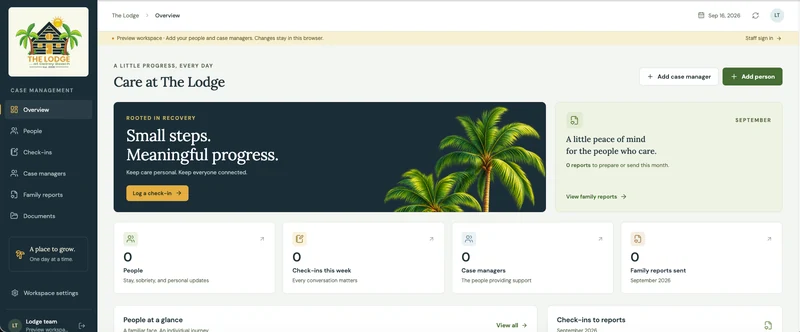
Resident information, case-manager assignments, check-ins, and documents give staff a place to maintain the material their reporting depends on.
The Lodge / Custom case management software
A branded case management application that links everyday resident records and staff check-ins to the preparation, editing, and approval of monthly family reports.
The problem
A monthly family update depends on work recorded throughout the month. Staff check-ins provide observations, resident information supplies context, and documents hold supporting material. The person preparing a report needs those inputs to be organized before writing begins.
Preparing an update also involves judgment. Staff need to refine the wording and review the finished report before approving it. The application needed to connect routine recordkeeping to that deliberate communication process.
What we built
The Lodge places resident information, case-manager assignments, check-ins, and documents within the case-management workspace. Staff can record daily updates in the context of the person they concern, while the reporting workflow gives that accumulated information a monthly purpose.
Report preparation, editing, review, and approval are separate steps. A draft is something staff can work on: refine the content, examine the family update, and move it through approval. The branded report is the output of that process.
A public demonstration lets prospective clients explore the application and follow a report from its source records through editing and review.
The working difference
The demonstrated workflow gives daily check-ins a path into a monthly communication process. Staff can maintain the source records, prepare a family update, and review its content before approval.
Inside the software
A closer look at the capabilities connected within the application.
Organize the person's information, case-manager assignment, check-ins, and supporting documents.
Staff record check-ins in the context of the resident they concern.
Build the branded family update and edit its content before review.
Staff examine the report and complete the application's approval step.
What this project demonstrates
Resident information, case-manager assignments, check-ins, and documents give staff a place to maintain the material their reporting depends on.
Staff can refine a family report as a draft, giving the person preparing it control over the final wording.
The workflow distinguishes preparing a report from approving it, making the point of review clear inside the application.
Apply the idea
The same reporting problem appears in professional services, field operations, and other businesses that turn weeks of activity into customer updates. Good software preserves the source information while giving the person responsible for the communication a clear review step.
For a similar build, we would first define the report's audience and required content. We would then work backward to what staff must capture during the month, who prepares the draft, and who approves the finished update.
Related development services
More from OmniQuake
A custom platform for Got Real Recovery's 24-hour caregiving operation, giving caregivers a place to record daily care and ownership the context to review it.
Sports application developmentA football intelligence application that brings major-provider data into mobile scoreboards and analysis views, using 650 data points to generate score and player predictions.
Connected operations platformA company-branded management product with distinct experiences for leadership, staff, residents, and alumni, each organized around the work that group needs to do.
Build with OmniQuake
Tell us where your team loses time. We’ll explore how software could help.